
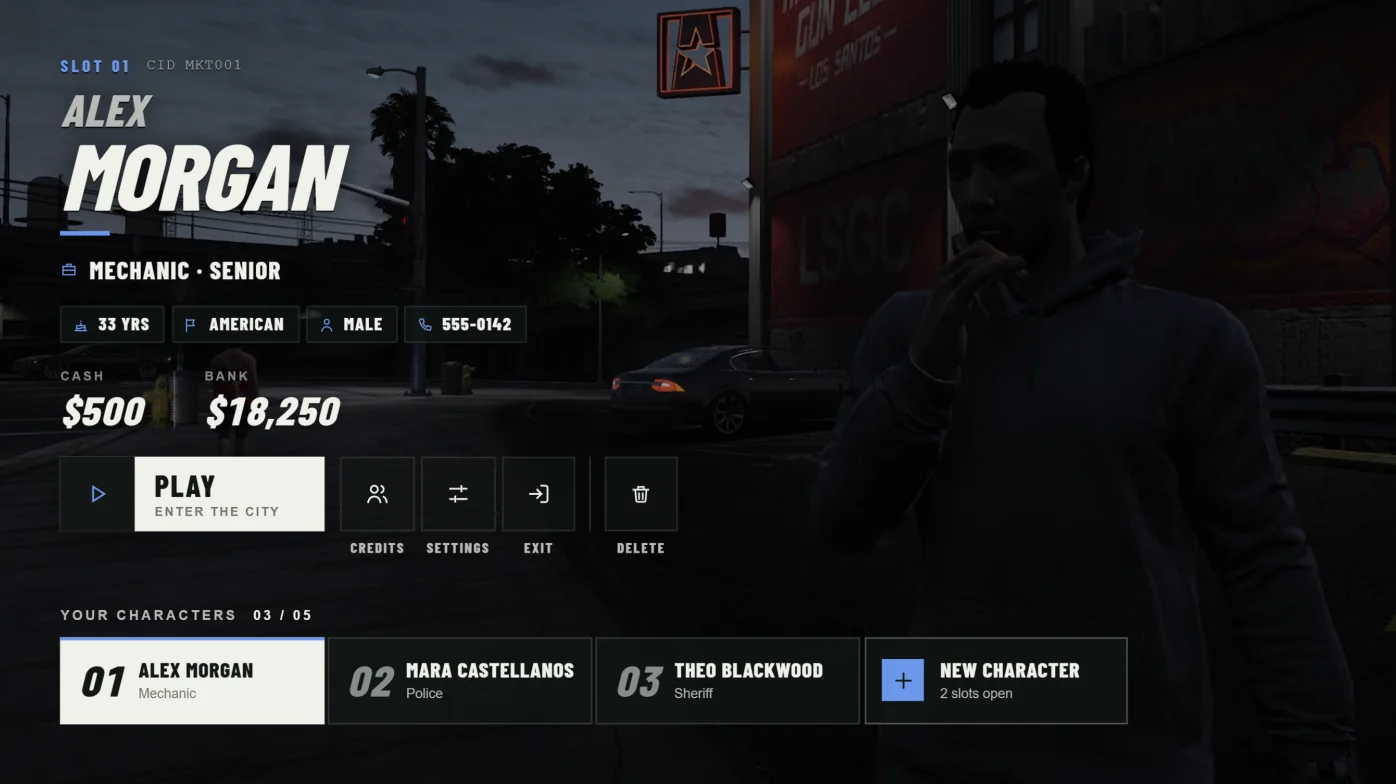
How scenes work
Each entry in Config.Scenes is a location. Each connection gets one random enabled location. It is kept through refresh, relog, and resource restart. Reconnecting picks again.
A location has an anchor and an optional list of spots. Each character takes a spot. Characters without a spot stand in a lineup at the anchor. They never borrow a spot from another location. Each player has a private routing bucket and local preview peds, so two players can share a location without seeing each other.
Three locations ship enabled: penthouse (Diamond Penthouse, eight authored spots), beach (Vespucci Beach, lineup only), and rooftop (City Rooftop, lineup only). The beach and rooftop are starting presets. Check ground level and framing on your map before using them.
Add a location
/cortex-scene-here captures a complete scene entry from where you stand. It copies the entry to your clipboard and prints it to F8. It does not save anything on the server.
- Load into the world. Stand where the lineup should be centred and face the direction the characters should face.
- Run /
cortex-scene-herewith a unique ID and a name, for example /cortex-scene-hereharbor Harbor View. - Paste the entry inside
Config.Scenesinconfig.lua. Set enabled = false while you are still working on it. - Restart
cortex-multicharacter. The empty spots list already works through the automatic lineup.
{
    id = 'my_rooftop',
    enabled = true,
    label = 'My Rooftop',
    anchor = { x = -1023.45, y = -418.42, z = 67.66, w = 205.69 },
    camera = { distance = 3.0, overviewDistance = 3.4 },
    lineup = { spacing = 1.0, maxWidth = 3.2 },
    time = { hour = 21, minute = 30 },
    weather = 'CLEAR',
    spots = {},
},Scene fields
IDs use letters, numbers, underscores, or hyphens. Keep them stable, because saved positions are stored by scene ID. Up to 64 locations and 64 spots per location are accepted. At least one location must be enabled.
| Field | Purpose |
|---|---|
| id | Stable unique ID. Saved spots are stored under it. |
| enabled | false keeps the scene out of new assignments. The editor can still find it. |
| label | Name shown in the editor. |
| anchor | Lineup centre as { x, y, z, w }. w is the direction the characters face. |
| camera, lineup | Optional overrides of Config.Camera and Config.Lineup for this location. |
| time, weather | Optional, for example time = { hour = 18, minute = 30 } and weather = 'CLEAR'. |
| spotOrder | Optional override of Config.SpotOrder for this location. |
| spots | Default spots. Saved in-game spots replace this whole list. |
Place characters with /cortex-spots
Use /cortex-spots while logged in and playing, not from the selection screen. It edits the nearest configured scene, including disabled ones, and shows that scene's name. Without a body argument, the stand-in copies your current model and appearance.
Run /cortex-spots with no number to author a new spot. Add a number to edit an existing spot, and add male or female to load that body. Run /cortex-spots again with no arguments to close the editor.
/cortex-spots
/cortex-spots 1
/cortex-spots 1 male
/cortex-spots 1 femaleEditor controls
The editor has three modes. Position moves the stand-in. Camera sets the selection camera. Aim moves the camera target. Hold Shift for fine movement in any mode.
| Control | Action |
|---|---|
| Arrows, PgUp/PgDn, Q/E | Position mode: move, change height, turn. |
| Scroll | Cycle the poses available for the current body or model. |
| B | Switch between the male and female stand-ins. |
| H | Toggle the selection camera preview. |
| G | Position mode: move the stand-in to you. |
| Tab | Cycle Position, Camera, and Aim. Camera and Aim open the preview. |
| Camera mode | Left/Right orbit, Up/Down closer or farther, PgUp/PgDn lens height, Q/E wider or tighter. |
| Aim mode | Arrows move the aim across the body, PgUp/PgDn aim height, Q/E shift the character left or right on screen. |
| R | Camera or Aim mode: toggle automatic angle search. |
| Z / C | Previous or next spot, including New. Unsaved edits are kept while the editor is open. |
| Enter | Save the current spot to the server. |
| Shift + Enter | Copy the current spot to the clipboard and F8 as config text. |
| Backspace | Close the editor and discard unsaved edits. |
Saving and permissions
Enter saves only the current spot, including its male, female, and model variants. Save each changed spot separately. Reopen selection to see the change. No config edit or restart is needed.
Saving needs the ACE in Director.SaveAce, which defaults to cortex.multicharacter.edit, or the admin ACE. Director.SaveRadius limits spots to 250 metres from the scene anchor by default. Values from 10 to 1000 are allowed.
Saves go to the resource's server KVP under scene-spots:SCENE_ID. The previous confirmed list is kept at scene-spots:SCENE_ID:backup. There is no reset command. Restoring a backup is a server maintenance task. Renaming a scene ID or the resource changes which saved data is found.
If another editor saved first, the save is rejected. Copy your work with Shift+Enter, close, reopen, and apply it again. If a save timed out, reopen and check before trying again.
add_ace group.admin cortex.multicharacter.edit allowBodies and poses
Each spot can hold separate male and female entries with their own pose, at position, and camera. Set either to false to disable that body at the spot. A new spot enables only the body you saved or edited. Spots and poses also accept models = { ['ped_model_name'] = { ... } } for an exact ped model. An exact model entry wins over the body entry.
Config.Poses defines 22 poses: stand, lookout, lean, think, couch, chair, lounge, bed, sofa, floor, arms_crossed, arms_folded, wait_relaxed, wait_impatient, think_chin, think_director, lean_relaxed, lean_bar, sit_casual, sit_forward, sit_ground, and sit_slouched. They use base-game animations only. Preview both bodies before assigning a seated or reclined pose. For a spot, at's z value is the seat or mattress height for sitting and lying poses.
Config.SpotOrder controls which character gets which spot. 'random' shuffles the spots each connection. 'config' uses list order, with slot 1 first. The default is 'random'.
Camera and lineup defaults
Config.Camera and Config.Lineup apply to every scene unless a scene or pose overrides them. The camera is pulled in automatically when a wall is close.
| Key | Default | Meaning |
|---|---|---|
| Camera.distance | 3.4 | Preferred lens distance in metres. |
| Camera.frame | 2.4 | Metres of height kept in shot. |
| Camera.screenX | 0.64 | Where the selected character stands on screen, 0 left to 1 right. |
| Camera.transition | 950 | Milliseconds between characters. |
| Camera.intro | 1900 | Milliseconds for the opening glide. |
| Camera.blur | true | Depth of field behind the selected character. |
| Lineup.spacing | 1.2 | Metres between characters. |
| Lineup.maxWidth | 5.4 | The line is compressed to fit this width. |
| Lineup.unselectedAlpha | 150 | Transparency of unselected characters, 0 to 255. |
Test a scene
To force one location while you work on it, temporarily enable only that scene and restart Cortex. Test with enough characters to fill the authored spots and the overflow lineup, then relog, restart the resource, and reconnect. Restore the normal enabled list when you are done.