
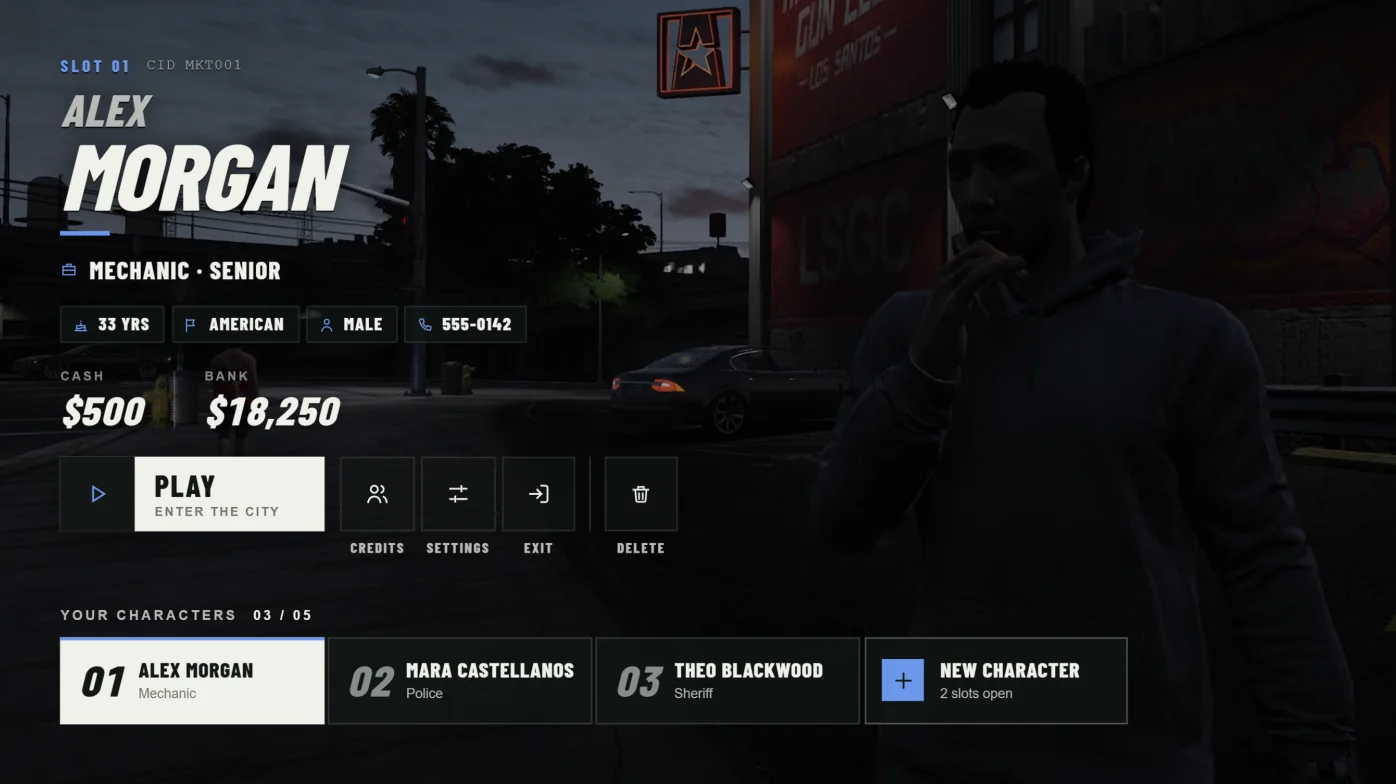
Before you start
Qbox with Illenium Appearance is the primary target. You need OneSync and these resources installed and working first: qbx_core, qbx_spawn, ox_lib, oxmysql, ox_inventory, spawnmanager, and illenium-appearance. Add qbx_properties when Qbox starting apartments are enabled. None of these are bundled. Cortex Lib is not required.
Finish Illenium's own database and framework setup before adding Cortex. Keep Qbox's QB bridge enabled. Cortex opens Illenium's first-character editor through the qb-clothes:client:CreateFirstCharacter event and relies on the QBCore loaded events. The bridge is on by default; do not set the qbx:enablebridge convar to false.
The compiled interface is included. You do not need Node or Bun on the server.
Back up first
Back up your framework database, your Qbox files, server.cfg, and the server's resource KVP data. The install patches two qbx_core files, and Cortex stores saved scene positions in KVP.
Replace your current character selector
Run only one character selector. Stop any other multicharacter resource before starting Cortex. On Qbox, the built-in selector lives inside qbx_core and is turned off through its config rather than by stopping a resource.
Cortex checks this at startup. It refuses to run until characters.useExternalCharacters is true and the guard below is installed.
- Remove or comment out the ensure line for any other multicharacter resource.
- In
qbx_core/config/client.lua, set characters.useExternalCharacters = true. - Leave characters.startingApartment as you want it. If it is true,
qbx_propertiesmust be running.
Add the resource
Keep the folder name cortex-multicharacter. The guard, the convar, and saved KVP data all depend on that name.
- Extract the
cortex-multicharacterfolder into your resources directory. - Open
config.luaand confirm the framework and appearance values below.
Framework = 'qbox',
Appearance = 'illenium-appearance',Install the Qbox character guard
Turning off Qbox's built-in selector hides its UI, but its server character handlers stay registered. The included installer adds an early return to six of them: getCharacters, getPreviewPedData, loadCharacter, createCharacter, the deprecated delete event, and DeleteCharacter. It also adds a GetExternalCharacterGuard export, which Cortex checks at startup. Trusted server exports and core admin deletion are not blocked.
Run it with PowerShell 7 (pwsh), which also runs on Linux. Quote any path that contains brackets, such as [qbx]. The second command only checks and writes nothing. The installer refuses Qbox layouts it does not recognise and backs up the two changed files to a temporary folder it prints. Move that backup somewhere permanent.
Run the installer and the check again after every Qbox update. Manual install steps are in docs/QBOX-GUARD.md inside the resource.
pwsh -File './cortex-multicharacter/install/qbox-guard.ps1' -QboxPath './qbx_core'
pwsh -File './cortex-multicharacter/install/qbox-guard.ps1' -QboxPath './qbx_core' -CheckSet the convar and start order
Set the convar before qbx_core starts. Keep it set even if you stop Cortex. Clearing it reopens Qbox's native character handlers.
This is the relevant order, not a full server.cfg. Omit qbx_properties only if starting apartments are off. Start your loading screen and weather resource before Cortex if you use them.
set qbx:externalCharacterResource "cortex-multicharacter"

ensure oxmysql
ensure ox_lib
ensure spawnmanager
ensure qbx_core
ensure ox_inventory
ensure illenium-appearance
ensure qbx_properties
ensure qbx_spawn
ensure cortex-multicharacterDatabase and saved data
The base install needs no SQL import. Characters stay in Qbox's own tables and are created through Qbox. Only optional VIP character slots need sql/vip-slots.sql. Leave VIP disabled unless you have imported it.
Saved scene positions, pending spawn handoffs, and starter-item delivery records are stored in the resource's server KVP data. Back up KVP together with your database. Copying config.lua alone does not keep in-game position edits.
Grant staff permissions
Grant only what you need. relog lets staff return to selection, edit lets staff save scene positions, and slots covers VIP slot staff commands. The admin ACE also passes the relog and edit checks.
add_ace group.admin cortex.multicharacter.relog allow
add_ace group.admin cortex.multicharacter.edit allow
add_ace group.admin cortex.multicharacter.slots allowRestart and check
Restart the full server, not just the resource. Then run the check command in the server console. It prints Ready with the framework and appearance resource, or the exact startup error.
- Run
cortex-multicharacter-checkin the server console. - Join and confirm the selection scene opens after loading.
- Create a test character. Confirm the appearance editor, starter items, and spawn.
- Log out and back in. Confirm the character, appearance, and inventory are kept.
- Test deletion on an expendable character.
cortex-multicharacter-checkQBCore adapter
A QBCore adapter is included, but it has not been tested on a live server. Use it on staging first.
Set Framework = 'qbcore', stop qb-multicharacter, and start qb-core, qb-spawn, illenium-appearance, and either qb-inventory or ox_inventory before Cortex. Cortex refuses to start on qbcore while qbx_core is running. New characters use the normal qb-spawn location selector, and there is no automatic first-time apartment. QBCore always uses DefaultSlots for character limits.
Update or roll back
When updating, back up config.lua, server/config.lua, your database, and KVP. Merge new config keys into your settings instead of replacing the file. Keep scene IDs and the resource name the same.
To return to Qbox's built-in selector, stop Cortex, set qbx:externalCharacterResource to an empty string, set characters.useExternalCharacters = false, and restart the full server. The installed guards then do nothing. Never run two selectors together.
set qbx:externalCharacterResource ""Troubleshooting
Startup errors are printed by cortex-multicharacter in the server console. Include the version, dependency versions, the failing action, and F8 or server errors when asking for help. Remove credentials and account identifiers first.
| Symptom | Check |
|---|---|
| Startup asks for the Qbox guard | Run the installer and -Check, confirm the convar is set before qbx_core, then restart the full server. |
| useExternalCharacters error | Set characters.useExternalCharacters = true in qbx_core/config/client.lua and restart the full server. |
| startingApartment requires qbx_properties | Start qbx_properties before Cortex, or set characters.startingApartment = false. |
| Old character menu appears | Disable the built-in Qbox selector, stop other selectors, and restart the full server. |
| Blank interface | Keep web/dist/index.html and every file in web/dist/assets from the same download. |
| Saved position missing | Check the scene ID, the resource name, and that the save was confirmed. Reopen selection to reload. |