
Load the library
Add the loader as a shared script. Your resource must use Lua 5.4, and cortex-lib must already be running when it starts. Otherwise the loader stops with an error.
The loader creates two globals: lib and cache. On the client, cache holds ped, playerId, serverId, vehicle, and seat, refreshed every 100 ms. Modules load the first time you use them. UI functions run inside cortex-lib, which owns the shared interface, focus, and cleanup.
fx_version 'cerulean'
game 'gta5'
lua54 'yes'

dependency 'cortex-lib'
shared_script '@cortex-lib/init.lua'Calling without the loader
Public functions are also cortex-lib exports. Use them when you do not load init.lua.
exports['cortex-lib']:notify({ type = 'success', description = 'Hello!' })Notifications
Client: lib.notify(data). Passing a string uses it as the description. Helpers: lib.notifySuccess(message, title, sound), lib.notifyError, lib.notifyWarning, and lib.notifyInfo. Remove one with lib.hideNotify(id), or all of yours with lib.clearNotifications().
Server: lib.notify(source, data) sends to one player and lib.notifyAll(data) sends to everyone.
-- client
lib.notify({ type = 'success', title = 'Saved', description = 'Your changes are stored.' })
lib.notifyError('Try again.', 'Failed')

-- server
lib.notify(source, { type = 'info', description = 'Sent from the server.' })| Field | Default | Values |
|---|---|---|
| type | 'info' | 'info', 'inform', 'success', 'warning', 'error' |
| title | '' | Up to 128 characters |
| description | '' | Up to 2048 characters |
| duration | 3000 | Milliseconds, up to 600000. 0 keeps it on screen. |
| persistent | false | true keeps it until hidden |
| position | Player's setting | 'top', 'top-right', 'top-left', 'bottom', 'bottom-right', 'bottom-left' |
| id | Generated | Your own ID, for lib.hideNotify(id) |
Alert dialogs
lib.alertDialog(data) waits for an answer, so call it from a thread. It returns 'confirm' or 'cancel'. A timeout, a replaced modal, or the owner resource stopping also returns 'cancel'.
Fields: header, content (a string or an array of lines), centered, cancel (false removes the cancel button), labels with confirm and cancel text (defaults 'CONFIRM' and 'CANCEL'), and timeout in milliseconds (default 120000).
CreateThread(function()
  local result = lib.alertDialog({
    header = 'Sell vehicle',
    content = 'This cannot be undone.',
    labels = { confirm = 'SELL', cancel = 'KEEP' },
  })

  if result == 'confirm' then
    TriggerServerEvent('myResource:server:sellVehicle')
  end
end)Progress
lib.progress(data) waits until the progress ends, so call it from a thread. It returns true when the duration completes, and false when the player cancels, dies, the ped changes, or another progress is already running.
duration is required (milliseconds, up to 600000). Optional fields: label, position ('bottom' default, 'top', 'center', 'middle'), style ('bar' default or 'circle'), canCancel, useWhileDead, disable with move, car, combat, and mouse, anim with dict and clip or scenario, and prop. Stop your own progress with lib.cancelProgress(). Check with lib.isProgressActive().
CreateThread(function()
  local completed = lib.progress({
    duration = 5000,
    label = 'Repairing engine',
    canCancel = true,
    disable = { move = true, combat = true },
    anim = { dict = 'mini@repair', clip = 'fixing_a_player' },
  })

  if completed then
    TriggerServerEvent('myResource:server:finishRepair')
  end
end)Interaction prompts
Prompts are display only. Your resource registers the key and performs the action; cortex-lib only draws the prompt.
lib.showInteraction(data) takes id, label, key, and priority. It returns true, or false and an error. Remove a prompt with lib.hideInteraction(id), or all of yours with lib.clearInteractions(). lib.setInteractions(items) replaces all of yours at once.
IDs are scoped to your resource. Each resource can show up to 8 prompts, with 16 in total. Prompts are removed when their resource stops. When two prompts share a key, only the highest priority is active, so check lib.isInteractionActive(id) before acting.
Add anchor to place a prompt in the world. Supported types are 'world', 'entity', and 'entity-bone'. Use lib.isInteractionVisible(id) to check that it is in range and on screen.
RegisterCommand('myresource_use', function()
  if not lib.isInteractionActive('bench') then return end
  -- The server must revalidate job, inventory and distance.
  TriggerServerEvent('myResource:server:useBench')
end, false)
RegisterKeyMapping('myresource_use', 'Use bench', 'keyboard', 'E')

lib.points.new({
  coords = vector3(-347.14, -133.42, 39.01),
  distance = 2.0,
  onEnter = function()
    lib.showInteraction({ id = 'bench', label = 'USE BENCH', key = 'E', priority = 50 })
  end,
  onExit = function()
    lib.hideInteraction('bench')
  end,
})Skill checks
lib.skillCheck(data) waits for a result, so call it from a thread. It returns passed and a reason. Only one check runs at a time; a second call returns false, 'busy'. Use lib.cancelSkillCheck() and lib.isSkillCheckActive() for your own checks.
Types are 'radial' (default), 'trace', 'hold', 'sequence', and 'mash'. A mash check attaches to an existing anchored prompt through interactionId, and you forward key presses with lib.skillCheckPress(id, down).
A passing result is local. The server must still authorise anything it unlocks.
CreateThread(function()
  local passed, reason = lib.skillCheck({
    type = 'radial', label = 'Set the tension', key = 'E',
    duration = 10000, speed = 0.55,
    targetStart = 0.55, targetSize = 0.14,
  })

  if passed then
    TriggerServerEvent('myResource:server:pickLock')
  else
    print(reason)
  end
end)| Option | Default | Allowed |
|---|---|---|
| type | 'radial' | 'radial', 'trace', 'hold', 'sequence', 'mash' |
| label | 'Skill check' | 1 to 64 bytes |
| key | 'E' | One letter, digit, or 'SPACE' |
| duration | 10000 | 1000 to 120000 ms |
| speed | 0.55 | 0.1 to 2 |
| targetStart | 0.55 | 0.1 to 0.9 |
| targetSize | 0.14 | 0.04 to 0.35; start plus size must not exceed 1 |
| direction | 'upper' | 'upper', 'lower' (trace) |
| keys | { 'E', 'R', 'E', 'Q' } | 2 to 8 keys (sequence) |
Callbacks
Register a handler with lib.callback.register(name, handler). On the server, the handler receives source first. Call it from the client with lib.callback.await(name, delay, ...) inside a thread, or lib.callback(name, delay, cb, ...) without waiting. Pass false for no delay.
On failure, await returns nil and an error such as 'timeout' or 'callback_not_found'. Requests time out after 30 seconds and are rate-limited per player. Treat every argument as untrusted and recheck permissions on the server.
-- server
lib.callback.register('myResource:getData', function(source, key)
  -- Revalidate permissions and state before returning or changing anything.
  return { key = key }
end)

-- client
CreateThread(function()
  local data = lib.callback.await('myResource:getData', false, 'test')
  print(json.encode(data))
end)Zones and points
lib.zones.box, lib.zones.sphere, and lib.zones.poly accept onEnter, onExit, inside, and debug. Box takes coords, size (default vector3(2, 2, 2)), and rotation in degrees. Sphere takes coords and radius (default 2.0). Poly takes at least three points and thickness (default 4.0). Remove a zone with zone:remove().
lib.points.new takes coords, distance (default 5.0), onEnter, onExit, and nearby. Inside nearby, self.currentDistance holds the player's distance. Remove a point with point:remove().
local zone = lib.zones.box({
  coords = vector3(0, 0, 0),
  size = vector3(10, 10, 5),
  rotation = 45,
  debug = false,
  onEnter = function() print('entered') end,
  onExit = function() print('exited') end,
})

local point = lib.points.new({
  coords = vector3(100.0, 200.0, 30.0),
  distance = 3.0,
  onEnter = function() lib.notify({ description = 'Near point' }) end,
})Register a settings page
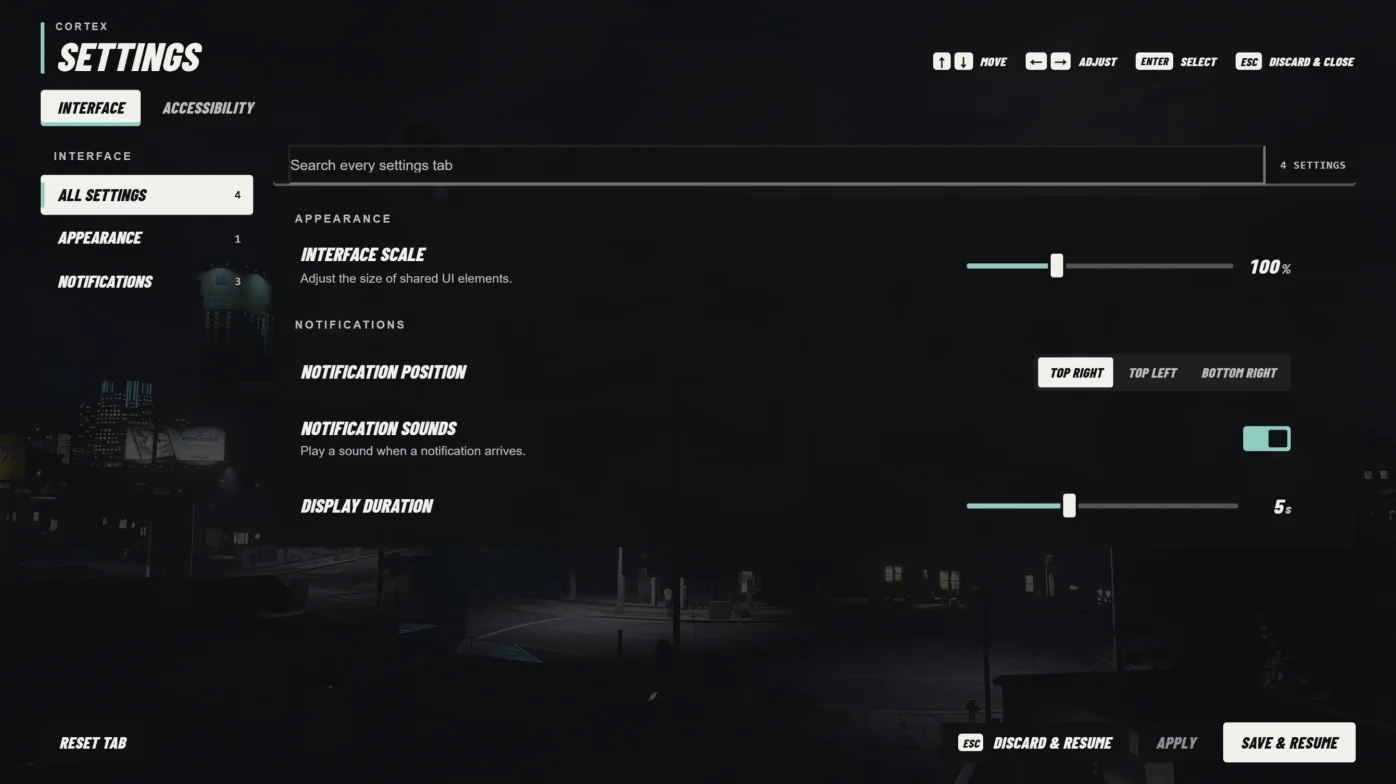
lib.registerSettings(tabId, tabLabel, kvpPrefix, fields, defaults) adds a tab to Cortex Settings. Use a stable prefix ending in a colon, such as 'myResource:'. It returns true, or false and an error. Tabs owned by another resource, or keys that clash with another tab, are rejected.
Field types are 'toggle', 'select', 'color', 'soundList', 'slider', 'buttons', 'text', and 'input'. Select and color take options with value and label. Slider takes min, max, step, and suffix.
Read values with lib.getTabSetting(tabId, key). React to changes with lib.onSettingChange(key, callback); the callback receives (value, key, tabId). It also runs for live previews and when a discarded preview is restored. Register again whenever cortex-lib restarts.
local function registerSettings()
  local ok, err = lib.registerSettings('myResource', 'My Resource', 'myResource:', {
    { key = 'enabled', type = 'toggle', label = 'Enabled', default = true },
    { key = 'opacity', type = 'slider', label = 'Opacity', min = 50, max = 100, step = 5, suffix = '%', default = 90 },
    { key = 'mode', type = 'select', label = 'Display mode', default = 'compact', options = {
      { value = 'compact', label = 'Compact' },
      { value = 'detailed', label = 'Detailed' },
    } },
  }, { enabled = true, opacity = 90, mode = 'compact' })

  if not ok then print(('Settings registration failed: %s'):format(err)) end
end

AddEventHandler('onClientResourceStart', function(resource)
  if resource == GetCurrentResourceName() or resource == 'cortex-lib' then
    registerSettings()
  end
end)

lib.onSettingChange('opacity', function(value)
  print(('opacity is now %s'):format(value))
end)