
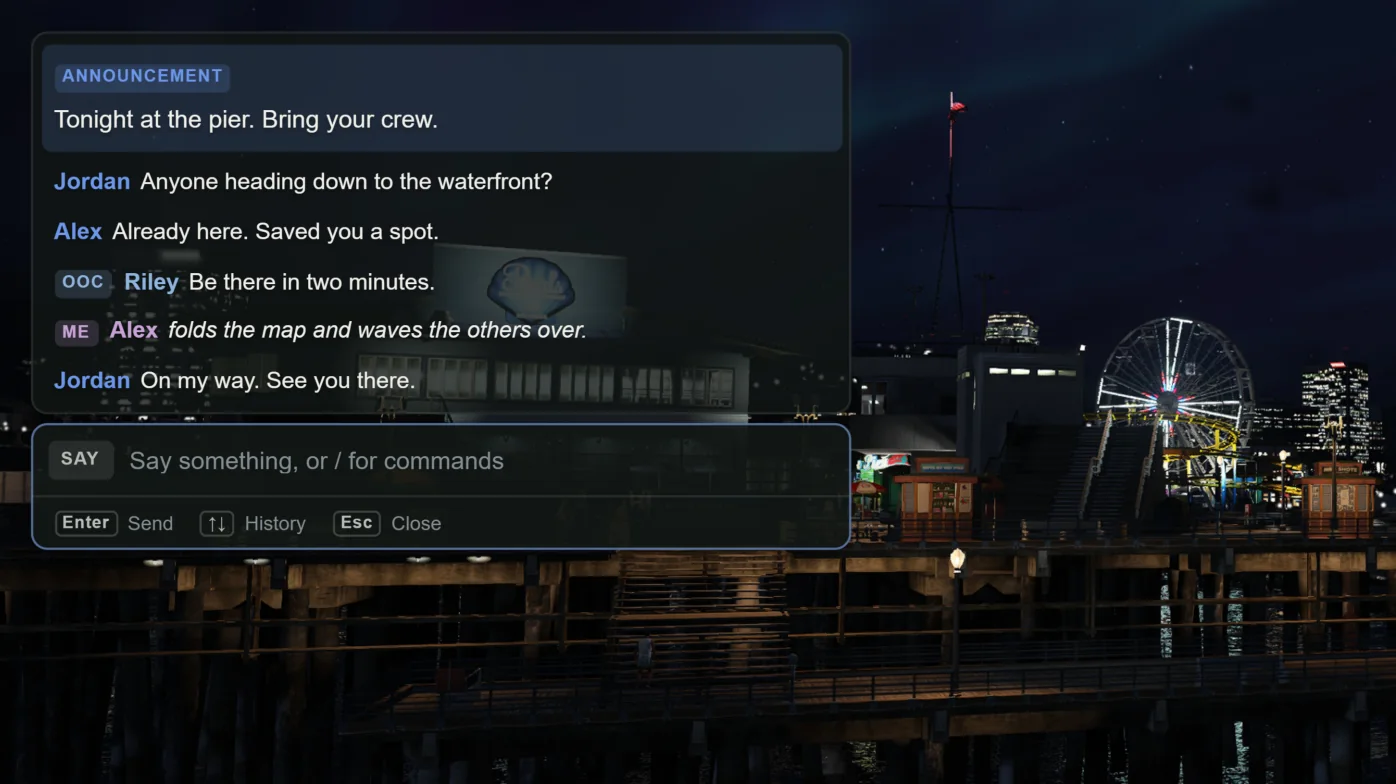
Type commands with or without a slash
Input starting with / runs a command. Input whose first word matches a registered command also runs it, so typing help works. Anything else is sent as a chat message.
A server can set Config.Chat.ForceCommand to treat all input as commands. Players can do the same for themselves with Command Line Mode.
Commands
Commands for /me, /gme, /ooc, /rolldice, and /dv exist only when enabled in config.lua. Chat, /me, /gme, /ooc, and /rolldice share the message cooldown and flood lock.
| Command | Who can use it | What it does |
|---|---|---|
| /help | Everyone | Shows how command detection works. |
| /clear | Everyone | Clears your own chat history. |
| /me action | Everyone | Shows your action as italic 3D text above your head to nearby players. |
| /gme action | Everyone | Posts a global italic action line to all players. |
| /ooc message | Everyone | Sends an out-of-character message, globally or to nearby players depending on Config.Ooc.Range. |
| /rolldice range | Everyone | Rolls a number shown as 3D text above your head. /rolldice 1-10 rolls 1 to 10. /rolldice 100 rolls 1 to 100. |
| /dv | Players with a /dv grant | Deletes the vehicle you are driving, or the nearest vehicle within range. |
| /togglechat | Everyone | Cycles chat visibility: Active, Hidden, Always Show. Bound to L by default. |
| /eschat_resetfocus | Everyone | Releases your controls if chat keeps focus. |
| /cortexsettings | Everyone | Opens Cortex Settings, provided by Cortex Lib. Choose the Chat tab. |
| cortexchat_dvcheck server-id | Server console only | Prints whether a player can use /dv and why. |
How /dv decides
The server checks permission, then the vehicle. It must be networked, within Config.Dv.Range (6 units by default), and in your routing bucket. If you are inside it, you must be the driver. Another driver or any other player inside blocks deletion.
One request is allowed every 1,500 ms by default. The success message appears only after the server confirms the vehicle is gone.
Keybinds
T and L are FiveM key mappings named Open Chat and Toggle Chat Visibility. Players can rebind them in FiveM's key binding settings.
| Key | Action |
|---|---|
| T | Open chat |
| L | Cycle chat visibility |
| Enter | Send |
| Escape | Close chat |
| Tab | Complete the selected suggestion |
| Arrow Up / Arrow Down | Move through suggestions, or browse your sent messages when no suggestions are shown |
| Page Up / Page Down | Scroll chat history |
Player settings
Open /cortexsettings and choose Chat. Changes apply immediately and are saved locally through Cortex Lib.
| Setting | Default | Options |
|---|---|---|
| Visibility | Active | Active fades messages after Fade Time. Always Show keeps them. Hidden turns chat off. L cycles the same setting. |
| Position | Top Left (Top Right when Config.Position.Side is 'right') | Top Left, Top Center, Top Right, Bottom Left, Bottom Right. |
| Size | Default | Small, Default, Large, Extra large. Scales text, spacing, and width together. |
| Background Opacity | 60% | 0 to 100% in steps of 5. The typing field stays solid. |
| Font | Cortex (Arial) | Cortex (Arial), Segoe UI, Bahnschrift, Cortex Condensed, Verdana, Tahoma, Trebuchet MS, Georgia (serif), Consolas (monospace). |
| Accent | Follow Cortex accent | Mint, Sky, Sage, Amber, Coral, Rose, Lavender, or Paper. |
| Custom Accent | Empty | A #RGB or #RRGGBB color. Overrides Accent when valid. |
| Accent Player Names | Off | Player names and ^3 text use the accent instead of amber. |
| Fade Time | 8 s | 1 to 30 seconds. Announcements stay twice as long. |
| History Length | 50 | 10 to 200 messages, in steps of 5. |
| Command Line Mode | Off | Treats everything you type as a command. |
Exports for developers
Server exports need a valid player ID, or -1 for everyone. An invalid target is rejected instead of broadcast. The resource sending the message decides who may send what.
-- Server: one player
exports['cortex-chat']:addMessage(source, { args = { 'Dispatch', 'Unit assigned.' }, type = 'info' })

-- Server: everyone
exports['cortex-chat']:addMessage(-1, { args = { 'Server restarting in 10 minutes.' }, type = 'announcement' })

-- Client: colored line with an author
exports['cortex-chat']:addMessage({ color = {255, 0, 0}, args = { 'Error', 'Something went wrong' } })| Side | Export | Use |
|---|---|---|
| Client | addMessage(data) | Add a message locally. |
| Client | registerSuggestion(name, help, params) | Add an autocomplete suggestion. help and params are optional. |
| Client | open() / close() | Open or close the chat input. |
| Client | isOpen() | Returns true while the input is open. |
| Client | getSettingsDefinition() | Returns the Chat settings definition used by Cortex Lib. |
| Server | addMessage(target, data) | Send a message to one player, or -1 for all. |
| Server | clearChat(target) | Clear chat for one player, or -1 for all. |
| Server | registerSuggestion(name, help, params) | Send a suggestion to all players. |
Message types
Set type on a message to change how it looks. Aliases: inform and notice become info, warn becomes warning, announce and broadcast become announcement.
color applies to plain and channel lines. Its hue is kept and softened to fit the palette. Color codes ^0 to ^9 work in text. template takes {0}, {1} placeholders and renders as plain text; HTML is shown as text and never runs.
| Type | Look |
|---|---|
| None | Player chat: name and plain text. |
| ooc, me, gme | Channel line with an OOC, ME, or GLOBAL label. me and gme are italic. |
| system, info | Steel blue notice card. |
| success | Sage notice card. |
| warning, spam-local | Amber-orange notice card. |
| error | Coral notice card. |
| announcement | Accent card with larger text that stays twice as long. |
Compatible events
The client listens for these events, so many existing resources keep working. Stock chat templates, chat modes, registerMessageHook, and exports['chat'] are not supported.
Player-to-server events such as cortex-chat:serverMessage are internal and rate limited. Use the server exports for trusted server messages.
| Event | Purpose |
|---|---|
| chat:addMessage | Standard Cfx chat message. |
| chatMessage | Legacy message with author, color, text. |
| chat:addSuggestion | Add one suggestion. |
| chat:addSuggestions | Add several suggestions. |
| chat:removeSuggestion | Remove a suggestion. |
| chat:clear | Clear local chat history. |
| cortex-chat:addMessage | Native Cortex Chat message. |
| cortex-chat:clear | Clear the chat window. |