Switchboard 1.0 · native for Windows

Keep the good parts.

Instant Replay with game, chat and mic on separate tracks. A library, an editor and montages. One small native app.

Free · Windows 10 and 11 · x64

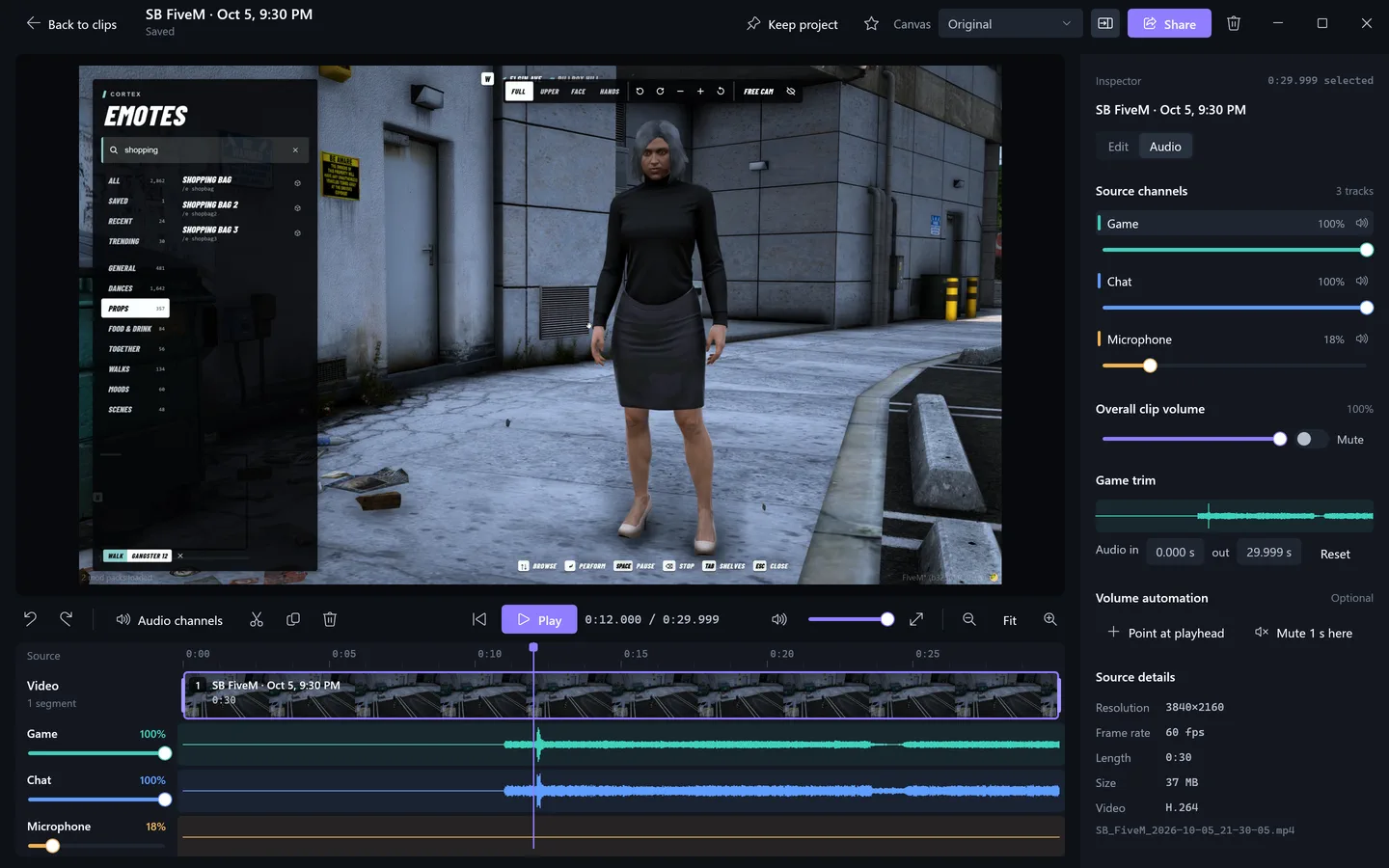
Switchboard's editor with a 30-second FiveM clip open at 0:12. The timeline shows one video segment with a filmstrip and separate Game, Chat and Microphone lanes with waveforms; the inspector's Audio tab shows per-track sliders, overall clip volume and source details: 3840×2160, 60 fps, 0:30, H.264.

One clip, three tracks: game, chat and mic arrive separated and ready to balance.

GameChatMiceach on its own lane

Rebuilt in Rust. An eighth of the memory.

One 11 MB Windows binary. No browser engine and no FFmpeg running while you play.

Replay running at 1440p60 with three tracks

Memory while recording, window closed88% less
Electron build: ~1,550 MBNative: ~180 MB
Memory with the window open on the library91% less
Electron build: 702 MBNative: ~60 MB at 4K

Native memory by what is running

Tray only, replay off
~3 MB
Library window, 1420×900
<20 MB
Library window, 4K
~60 MB
Recording 1440p60, three tracks
~180 MB

CPU while recording†

Electron build FFmpeg alone, September probe
2.25%
Native
0.2 to 0.3%

Processes while recording

Electron build
ElectronCapture.HostFFmpegFFmpegFFmpegFFmpeg
Native
1 process

Saving a clip

30 to 110 ms

Memory drift over a 10-minute recording†
+0.8 MB
Executable, no installer
11 MB
The author's own measurements on one PC (RX 9070 XT, Ryzen 9 9950X3D). Electron figures are live samples of the installed 0.9 build, not a controlled comparison. † An earlier measurement of the native build, taken before its latest capture changes.

The session ends. The clips stay.

One shortcut saves the last 15 seconds to 10 minutes. Clips land in a searchable library, grouped by day.

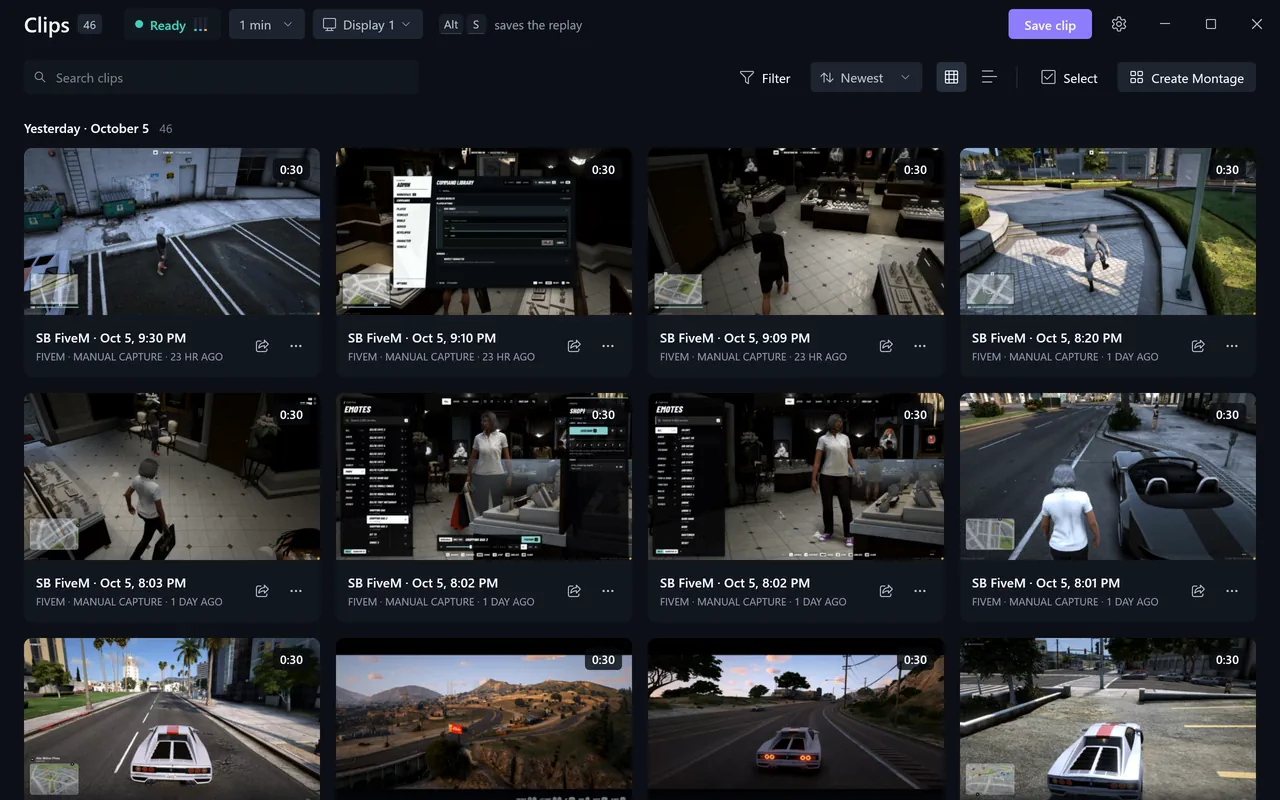
Switchboard's clip library in grid view: 46 clips, a green Ready recorder chip with level bars, the save shortcut shown as keycaps, search, filters, sort, grid and list toggles, Select and Create Montage, and fifteen 30-second FiveM clip tiles grouped under Yesterday, October 5.

The library: grouped by day, searchable, with the recorder always in view.

The Instant Replay popover open over the clip library: a toggle switched on, the text 'Keeping the last 1:00 at 2560×1440, 30 fps', a full buffer bar reading 1:00 / 1:00, level meters for Game, Discord and Microphone, and a Replay settings button.

The recorder at a glance: buffer, and live Game, Discord and Mic levels.

Default save shortcut
CtrlShiftF10
Keep the last
15 s30 s1 min2 min3 min5 min10 min

Make the cut.

Trim by the frame, change speed, reframe for 9:16, 1:1 or 4:5, and blur what should stay private. Game, chat and mic each keep their own fader.

Balance the tracksSet, mute or automate game, chat and mic separately.

Every audio track on its own lane, balanced after the fact.

Fit the upload limit.

Export at 10, 25 or 50 MB, or keep the original. Drag the copy into Discord; it clears when Switchboard closes.

  1. 10 MBFits Discord's free upload limit
  2. 25 MBSharper, still quick to upload
  3. 50 MBSharpest with a size limit
  4. OriginalFull quality, no size limit
The Export for sharing dialog beginning a 10 MB export over the Switchboard clip library.

A real export, dialog to ready, in real time

It can press the button for you.

Auto Capture saves clips without the shortcut.

Settings scrolled to Auto Capture: game events on with 20 seconds before and 10 seconds after each event, nearby events combined, Counter-Strike 2 with a Set up button and event chips for kills, headshots, multi-kills, round wins, match wins and deaths, War Thunder marked experimental, Battlefield 6 with no supported event source, and Reactions on at Balanced sensitivity.

Auto Capture: clip kills and round wins in supported games, or your loudest reactions.

Game events.

Counter-Strike 2 kills and round wins through Game State Integration, after a one-time setup. War Thunder is experimental.
The Instant Replay popover open over the clip library: a toggle switched on, the text 'Keeping the last 1:00 at 2560×1440, 30 fps', a full buffer bar reading 1:00 / 1:00, level meters for Game, Discord and Microphone, and a Replay settings button.

The recorder at a glance: buffer, and live Game, Discord and Mic levels.

Reactions, and a recorder you can read.

Reactions save a clip when you shout or laugh into the mic. The recorder chip shows the buffer and live levels.

Light while you play.

Frames stay on the GPU
Captured and H.264-encoded on the graphics card. Raw frames never reach system memory.
Three tracks, one clock
Game, chat and mic are captured separately on the video's clock.
The original stays
Edits and exports are copies. The saved recording is never touched.

Questions

Why does Windows warn me?

The executable is not code-signed, so SmartScreen may show an unknown-publisher warning. The download points to the official native-v release on GitHub, published with a SHA-256 file you can check.

Do I need anything else installed?

Recording and saving need nothing else. Exporting a share copy uses FFmpeg, which is not bundled: put ffmpeg on your PATH or next to the executable, otherwise the export dialog tells you it was not found.

Which games does Auto Capture support?

Counter-Strike 2 through Game State Integration, after the setup step in the app. War Thunder is experimental. Other games can still be clipped with the shortcut or with Reactions.

What happened to the device controls and audio mixer?

Switchboard 1.0 is a clipping app. The device controls and experimental audio mixer from the 0.9 Electron builds are not part of the native build.

Switchboard 1.0 for Windows

Your next great clip starts here.

One 11 MB executable for Windows x64. No installer, no account.

Free · Windows 10 and 11 · x64

A single 11 MB executable, not code-signed; Windows may show a publisher warning. Share exports need FFmpeg on your PATH.